
Go to Windows platform Display platforms icon
Go to Windows platform Go to Mac platform Go to Android platform
RetroArch icon

RetroArch

1.22.2.0
4 9 reviews
463 k downloads
security security

One frontend for all your emulators

Advertisement
Remove ads and more with Turbo
Advertisement
Remove ads and more with Turbo
Andrés López icon
Reviewed by
Andrés López
Content Editor
Andrés López is part of Uptodown's in-house Editorial Team. Translated by Uptodown Localization Team

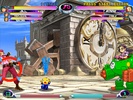
RetroArch is a frontend that allows you to comfortably manage dozens of emulators of practically every existing console from a single interface. The program is completely free, open source, and multi-platform, so it can be run on Windows, but also on RetroArch Mac, Linux, Android, iOS, and even some consoles like the PS3, PSP, or Wii.

A host of consoles and emulators at your disposal

RetroArch includes a huge list of cores (plugins required to emulate consoles). Among the supported cores that you can download directly are the following: PlayStation 1 (PCSX ReARMed), Super Nintendo (SNES9x Next), Nintendo Entertainment System (FCEUmm/NEStopia), GameBoy/GameBoy Color (Gambatte), GameBoy Advance (VBA Next), Arcade (Final Burn Alpha), Neo Geo Pocket Color (Mednafen NGP), Virtual Boy (Mednafen VB), Sega Genesis/Mega Drive (Genesis Plus GX), Sega Master System/Sega Game Gear (Genesis Plus GX), Sega CD/Mega CD (Genesis Plus GX), Dreamcast (Flycast), PC Engine/PC Engine CD (Mednafen PCE Fast), WonderSwan Color/Crystal (Mednafen Wonderswan), PS2 (LRPS2). Moreover, new cores, consoles, and emulators are added to this list with each update.

Advertisement
Remove ads and more with Turbo

Download classic games too

As if the full catalogs of all these game consoles weren't already enough, RetroArch also offers cores that allow you to comfortably play Tomb Raider (OpenLara), Doom (PrBoom), and Quake (TyrQuake). In any case, you should be aware that RetroArch does not come with any ROM or BIOS. Emulator cores can be conveniently downloaded with a single click, but any ROM you want to play or any official asset must be downloaded separately from another website.

Very easy to configure

One of the great advantages RetroArch holds over other similar programs, or over using the emulators separately, is how easy it is to set up. The program has a very comfortable interface, which has been specially designed to be navigated with a controller. In fact, any gamepad connected to your PC will be configured automatically, regardless of whether it is a PlayStation or Xbox controller. If you ever have any problems configuring the program, tutorials are easy to find on YouTube.

Achievements and online play

RetroArch also offers online play with a friend, as if they were right next to you. Netplay Mode means you can set up online games and join your friends' online games. That being said, setting up an online game for the first time can be tricky, so it's best to follow the complete tutorial on how to do it from the official website. And the best part? You can earn achievements as you play old games, as if playing on a modern console.

All your emulators under one umbrella

Download RetroArch and start using what is by far the best collection of emulators you can find. Other emulators can help you play games from one or two consoles, but RetroArch has the potential to emulate tens of thousands of games, all from a single interface—a real treat for fans of video games in general and those passionate about emulation in particular.

Information about RetroArch 1.22.2.0

Basic information

Developer Libreto
License Free
Category Emulators
Rating All ages
Languages English
47 more

Security and privacy

Required permissions Not applicable
Advertising Not specified
See security and antivirus report
Why is this app published on Uptodown? (More information)

Download info

Downloads 463,007
Date Nov 21, 2025
File type 7Z
Size 193.13 MB
SHA256 b2139b1d0f9d4526dc6b5ce23cbb3efdc766096fa6f2c3df016818b486ac6372
Advertisement
Remove ads and more with Turbo

Older versions

See more
exe 1.22.1.0 Nov 15, 2025
exe 1.21.0 Oct 29, 2025
exe 1.21.0 (stable) Apr 30, 2025
exe 1.21.0 Apr 18, 2025
7z 1.20.0 Jan 7, 2025
exe 1.20.0 (Nightly) Jan 2, 2025
Available for other platforms

Rate this App

Review the app
RetroArch icon

Rating

4.0
5
4
3
2
1
9 reviews

Comments

See more
uptodownfans icon
uptodownfans Uptodown Turbo
9 months ago

An emulator to rule them all. Its unbeatable way to consolidate all emulation-related software into a single tool with a unique, sober, and modular interface. The cross-platform standard that we emula...See more

Like
Reply
magnificentpinkleopard55840 icon
magnificentpinkleopard55840
in 2022

Awesome work!

3
Reply
baralgin icon
baralgin
in 2021

There are many questions.

8
Reply
proudbrownsquirrel90959 icon
proudbrownsquirrel90959
in 2020

Tested with W10 64b I7 16 GB RAM and AMAZING!!! I first tried all the most powerful consoles without problems. I was surprised by the WII and PS2. I imagine that with the smaller ones it will be the s...See more

10
Reply
karlospinh icon
karlospinh
in 2020

I am having an issue with the PS2 core (play!), the core won't load :( How do I solve this?

10
Reply
andersonup icon
andersonup
in 2018

First of all, congratulations on the site. On my Windows 10, 64-bit, it only opens the blank start screen for a few seconds and then closes. Could you tell me how I can resolve this issue?

15
Reply
See more
Advertisement
Remove ads and more with Turbo
Citron icon
A powerful Switch emulator for Windows based on Yuzu
Sudachi icon
An excellent Swtich emulator for Windows
Azahar Emulator icon
3DS emulator that takes the baton from Citra
RetroBat icon
All your emulators and games in one place
FCEUX icon
One of the most comprehensive NES emulators you can find
Project64 Legacy icon
A light and powerful Nintendo 64 emulator
Ares icon
A multi-system emulator for more than 20 consoles
Jgenesis icon
James Groth
Citron icon
A powerful Switch emulator for Windows based on Yuzu
Sudachi icon
An excellent Swtich emulator for Windows
Luanti icon
Like Minecraft, but Free and Open Source
FlightGear icon
Exciting open source flight simulator
Racer icon
An open source driving simulator
Banjo: Recompiled icon
PC port of the N64 classic Banjo-Kazooie
GnollHack icon
A remastered and simplified version of NetHack
Fallout Community Edition icon
Play the original Fallout comfortably on a modern PC
GTA IV: San Andreas icon
San Andreas is back to life in GTA IV
Need for Speed Most Wanted icon
Can you become the Most Wanted?
Minecraft icon
Build, create and give free rein to your imagination.
Roblox icon
A platform with millions of games
Tekken Tag Tournament icon
The PlayStation 2 classic, now on your PC thanks to MAME
eFootball 2026 icon
Feel the magic of soccer on PC
Car Parking Multiplayer icon
Drive freely around the city
BlueStacks icon
Emulate any Android app on your PC